Indestera

Manufacturing and MES

A more efficient line, a smarter MES.

Every production minute counts. Agents anticipate maintenance needs, assure quality on every product and update the plan at once, so your line runs longer and more efficiently.

Integration

Start now, with your MES or with the ready-made pack.

With your existing MES

Your investment gains value. Indestera works with your existing MES's work order, downtime and quality data and records approved outcomes in it, so you move to AI while keeping your system.

  • Your current system stays as it is
  • Only the data you allow is accessed
  • Every change is on record

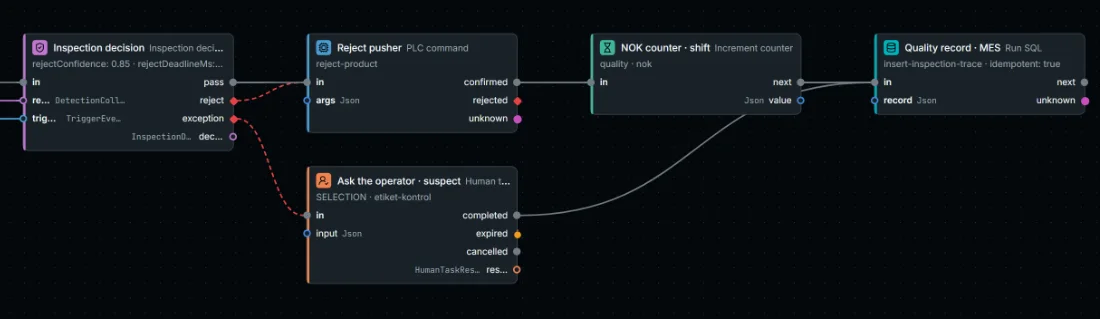
End of the visual quality flow in Studio: inspection decision, reject piston, operator task, NOK counter and quality record in the MES

With the Indestera MES pack

Digitise your line quickly with a lean setup. Work orders, production counts, downtime reasons, andon and OEE come ready to use, on every line, with or without a PLC.

  • Operator and manager screens included
  • OEE calculated to international definitions
  • Templates for lines with and without a PLC
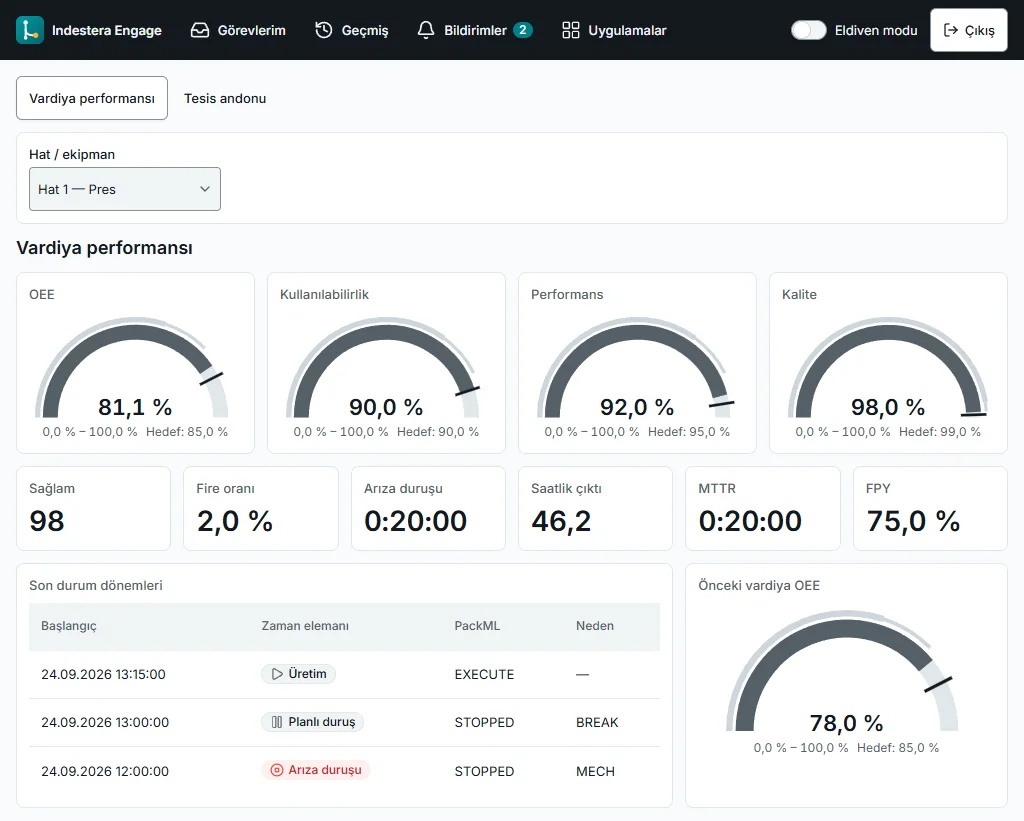
Line OEE dashboard in Engage: OEE, availability, performance and quality gauges, good count, scrap rate, breakdown time and recent state periods

MES screens

A screen made for every role on the floor.

From operator to plant manager, everyone sees the same truth on their own screen, so efficiency opportunities are spotted instantly.

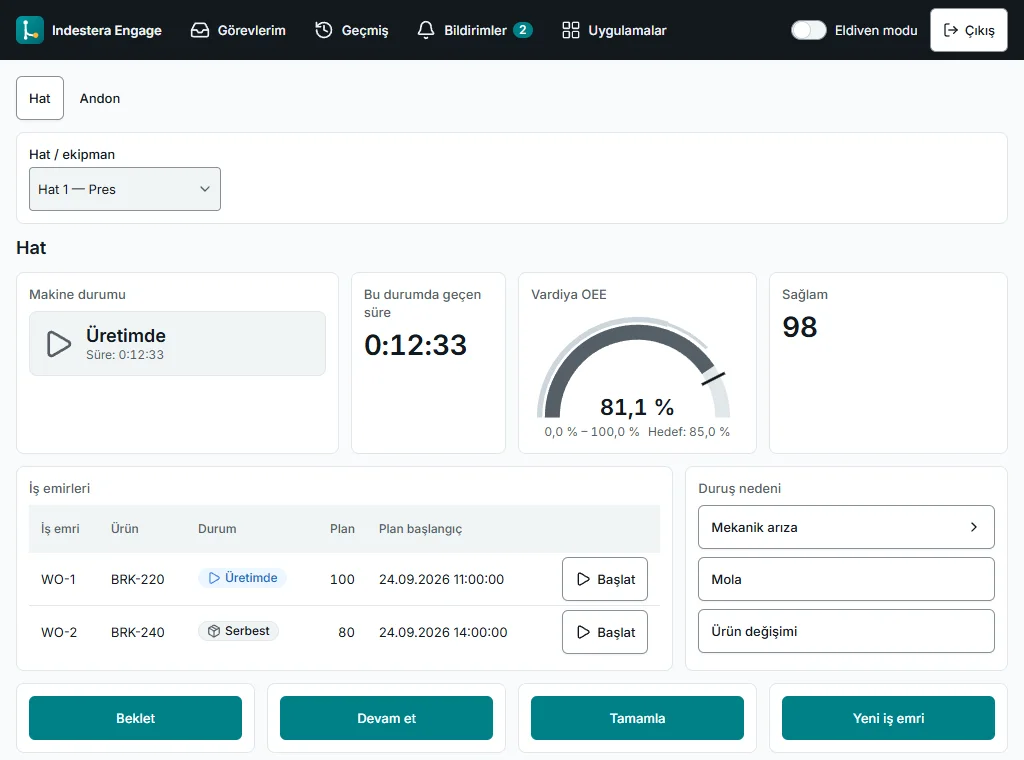
Engage operator terminal: machine state, time in state, shift OEE, good count, work order list, downtime reason selection and hold, resume and complete buttons
Operator terminalOperators record a downtime reason in a few taps and always see the shift target.
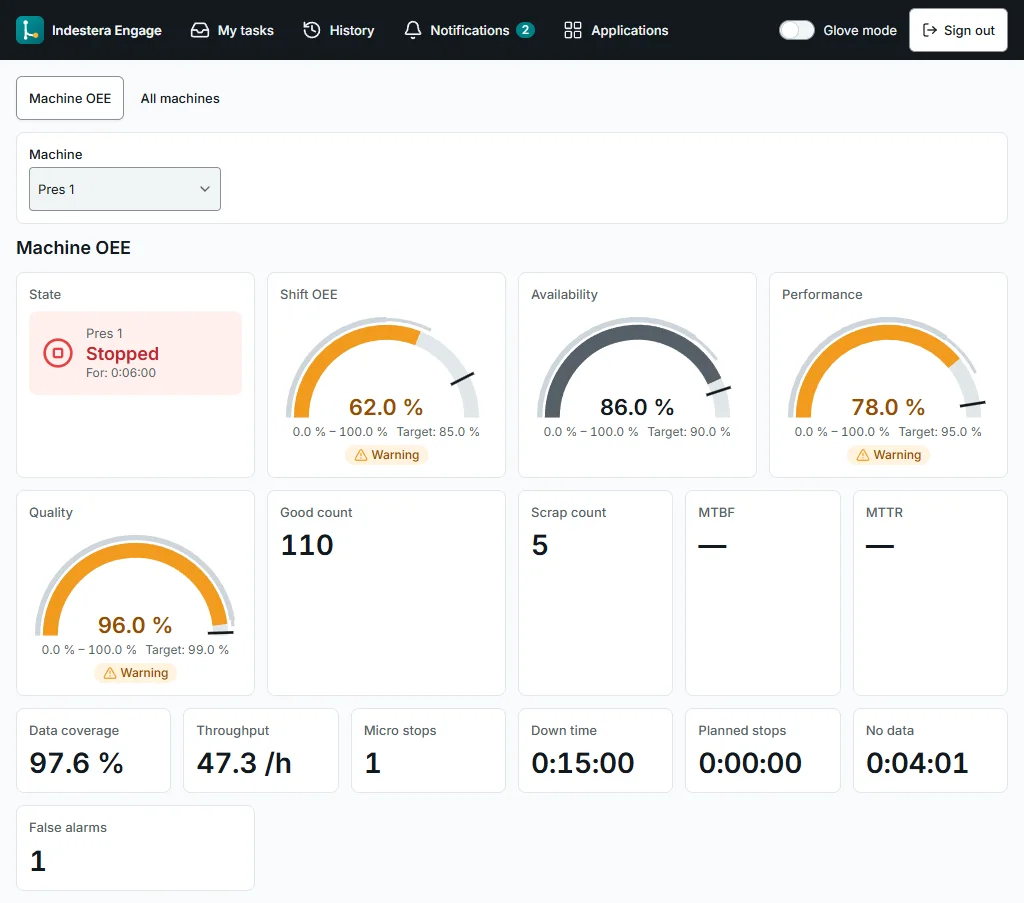
Machine OEE screen: machine state, shift OEE, availability, performance and quality gauges, good and scrap count
Machine OEE and efficiency analysisThe steps that raise efficiency are visible at once, so improvement starts in the right place.
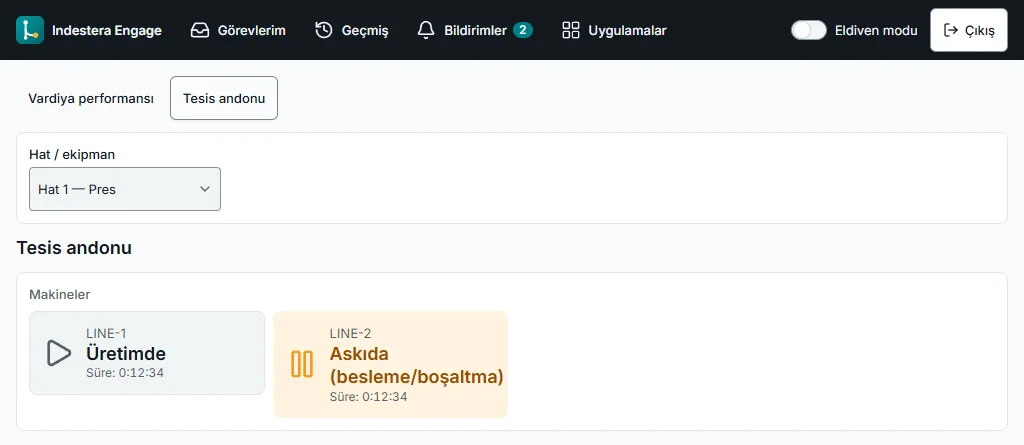
Plant andon: lines running or held, with time in state
Plant andonThe state of every line is visible across the plant, so the response starts at once.

Scenarios

Agents take it on, your production gains.

Each scenario starts from a ready-made flow that you adapt to your lines and systems.

Predictive maintenance

Maintenance, one step ahead

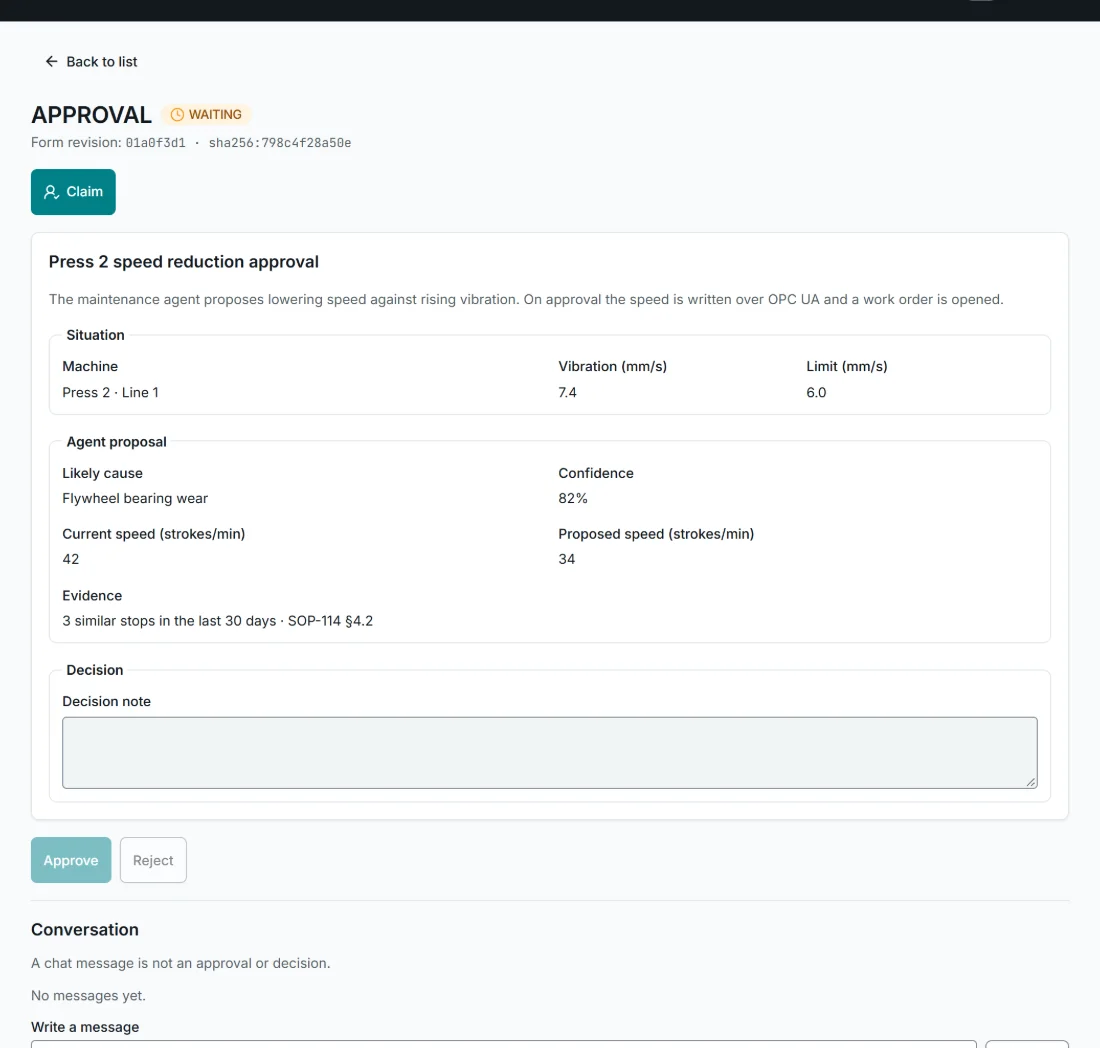
When vibration rises, the agent finds the cause, proposes a lower speed and opens the work order.

Flow · Predictive maintenance
Predictive maintenance flow in Studio: Press 2 vibration signal, last 30 days of downtime, maintenance procedure, maintenance agent, decision schema, set-point policy, shift lead approval, OPC UA speed setting, CMMS work order and ERP spare part reservation
  1. 01The vibration limit is exceeded
  2. 02Downtime history and procedure are reviewed
  3. 03The agent proposes a lower speed
  4. 04The speed change needs approval
  5. 05The shift lead approves
  6. 06The new speed is written to the machine
  7. 07A work order opens, a part is reserved
  1. Today

    By the time a vibration alarm is noticed, the machine is often about to stop, and manuals and past records are searched by hand.

  2. With Indestera

    The agent reviews downtime history and the maintenance procedure and proposes a lower speed; once the shift lead approves, it sets the speed and opens the work order.

  3. Result

    Line availability rises, and maintenance happens on your plan, at your time.

Press 2 speed reduction approval in Engage: machine, vibration and limit, likely cause, confidence, current and proposed speed, evidence and decision note

Visual quality

Every product leaves with assured quality

A camera inspects every product; doubtful ones go to an operator for a decision.

Flow · Visual quality
Visual quality flow in Studio: product sensor, camera capture, label defect model, inspection decision, reject piston, operator task, NOK counter and MES quality record
  1. 01A product reaches the station
  2. 02The camera captures, the model inspects
  3. 03The label is flagged as doubtful
  4. 04The operator decides
  5. 05The result is recorded in the MES
  1. Today

    Label defects are caught late by sampling, and decisions on doubtful products are recorded by hand.

  2. With Indestera

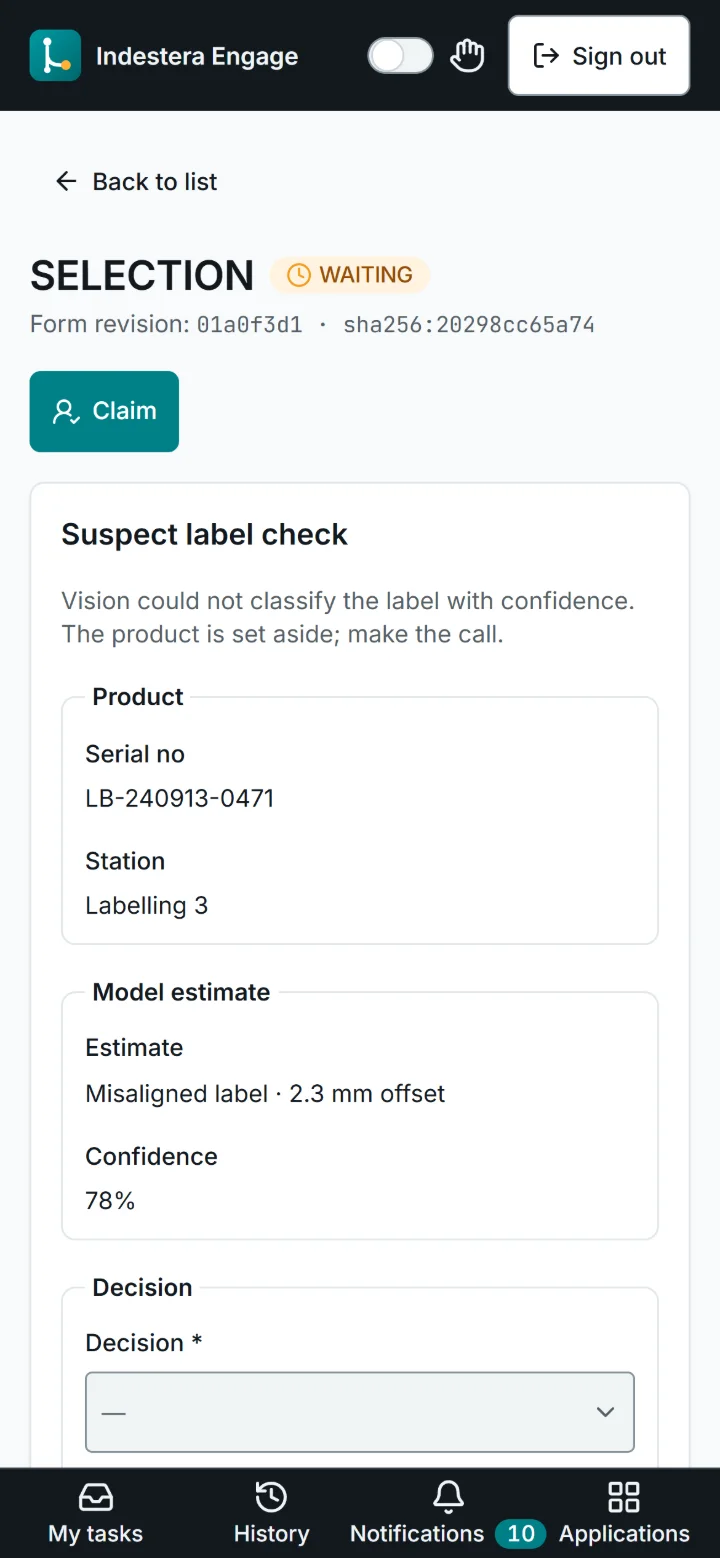
    A camera captures every product and a model inspects the label; clear defects are diverted, doubtful products go to an operator and the decision is written to the MES.

  3. Result

    Only flawless products reach your customers, and your brand's reputation grows stronger.

Doubtful label check on a phone: serial number, station, model estimate, confidence and decision options

Downtime management

The plan keeps pace with the floor

A stop reported by the operator updates the order sequence and the maintenance work order together.

Flow · Downtime management
Stop request flow in Studio: stop request from Engage, shift plan and order queue, planning agent, lateness check, resequencing in the ERP, CMMS maintenance work order and Teams notice
  1. 01The operator reports a stop
  2. 02Shift plan and queue are reviewed
  3. 03The agent assesses the impact
  4. 04A late order is identified
  5. 05The order sequence is updated
  6. 06A maintenance work order opens
  7. 07Planning and maintenance are informed
  1. Today

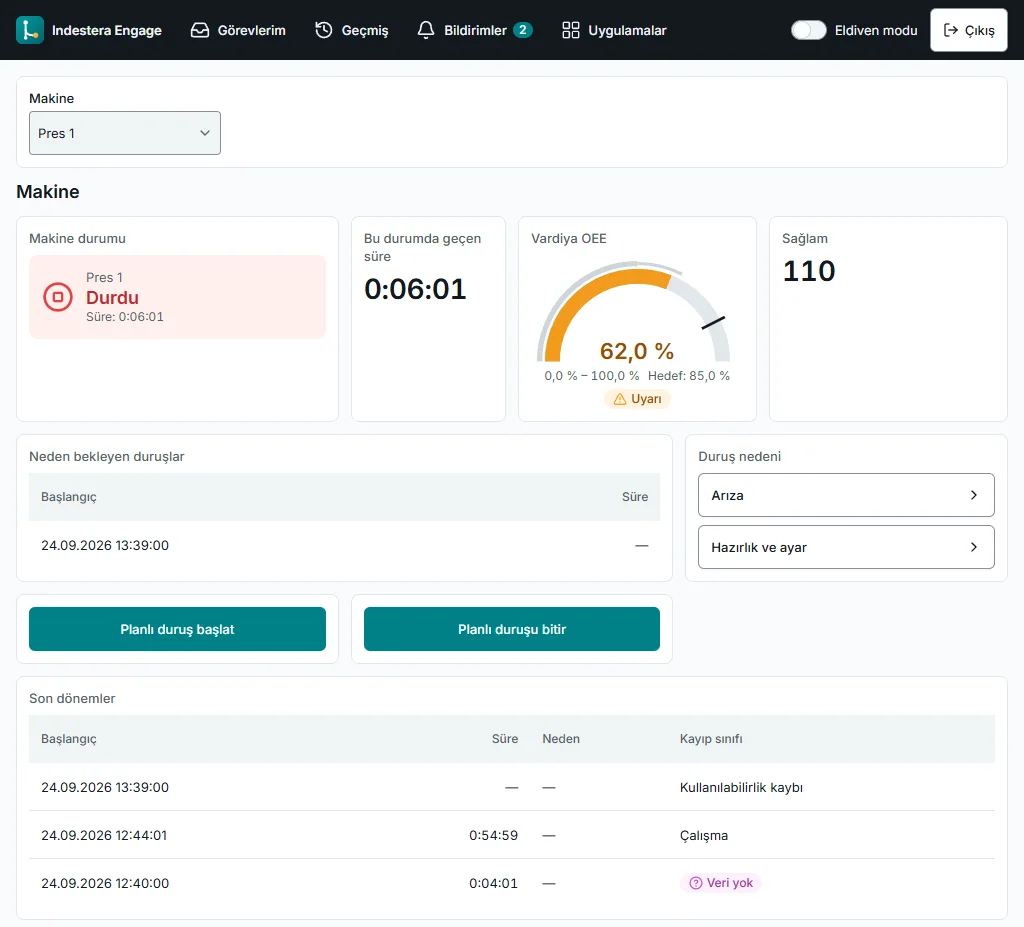
    When a line stops unexpectedly, planning and maintenance are called by phone and the order sequence is updated late.

  2. With Indestera

    The agent reviews the shift plan and order queue; if an order will be late it resequences orders in the ERP, opens a maintenance work order and informs the teams.

  3. Result

    Planning and maintenance act at the same time, and your delivery dates hold.

Engage operator terminal: stopped machine, time in state, shift OEE, stops awaiting a reason, downtime reason selection and recent periods

Spare parts

Critical spares, always on the shelf

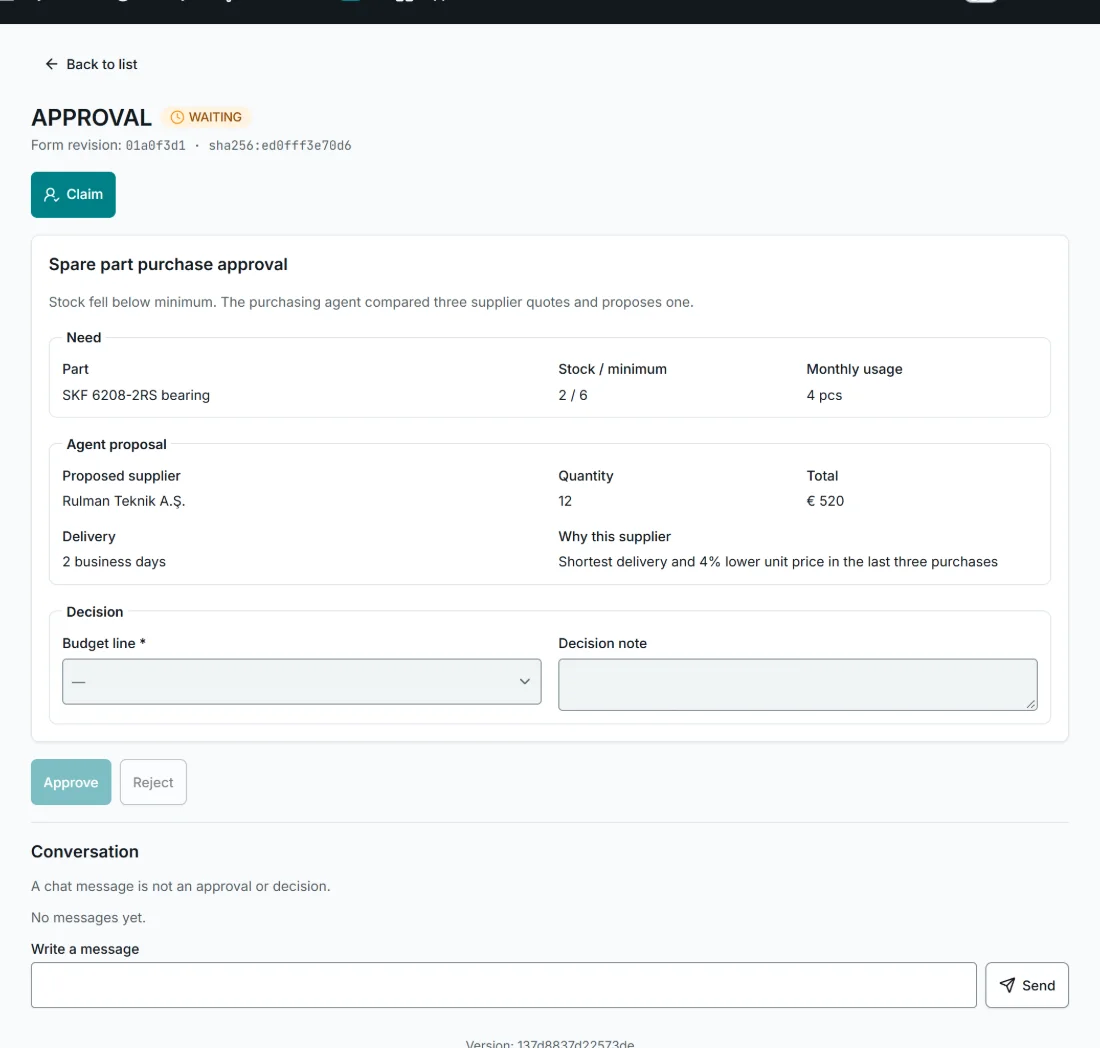
When stock falls below the minimum, the agent compares quotes and prepares the order.

Flow · Spare parts
Spare part purchasing flow in Studio: ERP stock alert, supplier quotes, purchasing agent, proposal schema, budget policy, purchasing manager approval, ERP order and planning notice
  1. 01Stock falls below the minimum
  2. 02Supplier quotes are collected
  3. 03The agent compares the quotes
  4. 04The amount needs budget approval
  5. 05The purchasing manager approves
  6. 06The order is created in the ERP
  7. 07Planning is informed
  1. Today

    A critical part is noticed only when it runs out, and collecting quotes and approvals takes days.

  2. With Indestera

    The agent compares supplier quotes on price, delivery time and past performance and creates the order in the ERP once the purchasing manager approves.

  3. Result

    Parts are on your shelf before they are needed, so maintenance runs as planned and the line keeps producing.

Spare part purchase approval in Engage: part, stock and minimum, monthly usage, proposed supplier, quantity, total, delivery time and rationale

Shift report

The shift report is prepared automatically

At the end of each shift, OEE, downtime and scrap are summarised and sent to the shift leads.

Flow · Shift report
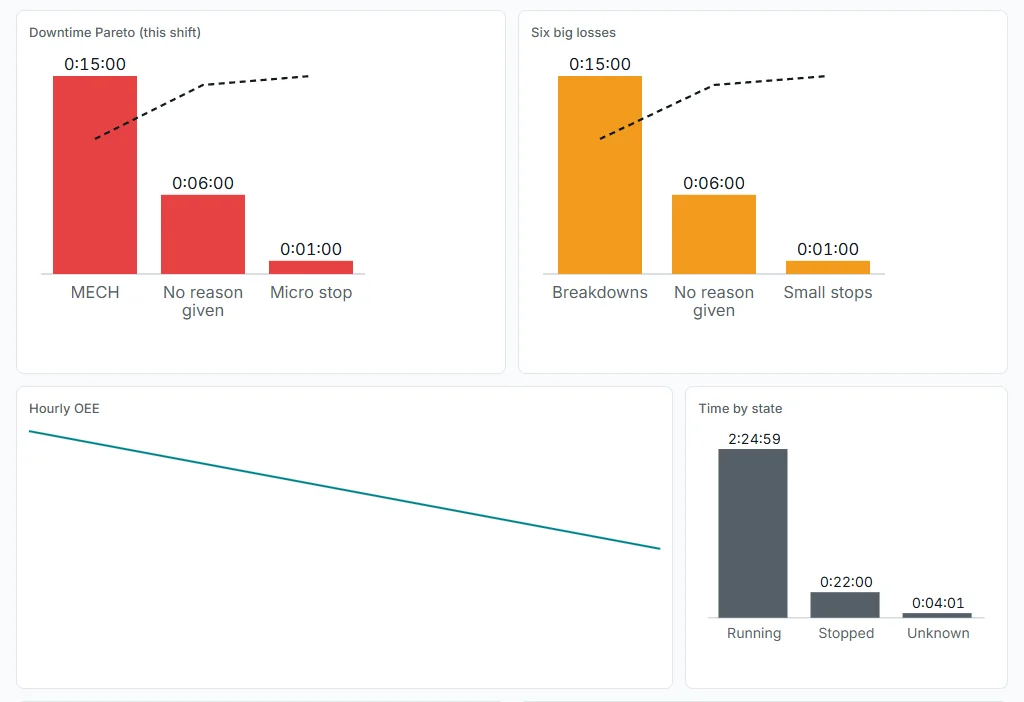
Shift report flow in Studio: end-of-shift schedule, OEE, downtime and NOK data, report agent, report schema and sending to shift leads via Teams
  1. 01The shift ends
  2. 02OEE, downtime and scrap are read
  3. 03The agent prepares the report
  4. 04The report is sent to the shift leads
  1. Today

    The end-of-shift report is compiled by hand from different screens, and major losses can be missed.

  2. With Indestera

    When the shift ends, the agent reads OEE, downtime and scrap data, summarises the main losses and their causes and sends the report to the shift leads.

  3. Result

    Every shift is reported on time, and improvement opportunities become visible right away.

Downtime Pareto chart, six big losses, hourly OEE trend and time by state

Standards

Built on industry standards.

ISA-95

Production data follows the ISA-95 model, so it speaks the same language as your ERP and MES.

ISO 22400

OEE and other indicators follow its definitions, so sites can be compared.

PackML state model

Machine states are tracked in a common language, so different machines read the same on one dashboard.

OPC UA

Connects to your existing machines over OPC UA, Modbus TCP and Siemens S7.

Standards alignment covers the product's data model and calculations.

Let's build your first agent together.

In thirty minutes we take one of your processes, build an agent tailored to it and show it running.

Book a demo